










G4 Owner’s Manual – 10 – Installing The Reserve Parachute Canopy
Before installing a reserve canopy in a Mirage, complete the following tasks:
- Check the canopy label to verify that the canopy is manufactured under an FAA TSO C23( ) and is clearly marked.
- Read and understand the Operating Limits section of this manual.
- Determine the operating limits of the entire assembly and record on the packing data card.
- Review any manufacturer Product Service Bulletins and/or FAA Airworthiness Directives that may be in effect for this canopy.
- Thoroughly inspect the canopy and lines for airworthiness.
- Record the required data on the packing data card for the reserve canopy and Mirage harness and container system.
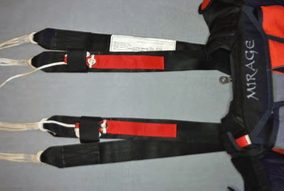
Lay the Mirage out face down with the reserve risers extended fully. The rear risers will be facing up. Make sure that the risers are not twisted.
Attach the reserve parachute canopy to the reserve risers, routing the four line groups to their correct riser. Perform a thorough suspension line continuity check after installation. Use of either Rapide Links or Slinks to attach the reserve parachute canopy suspension lines to the risers is authorized in accordance with the canopy manufacturer’s recommendations.
Follow reserve parachute canopy manufacturer’s instructions for assembling Slinks.
Tacking through the risers to keep the Slinks tabs centered within the riser loops is authorized. Take care not to tack through the Slink line or the tab. Tack in a way that no strain is placed on Slink or its tab during deployment.

When installing Rapide Links, installation of vinyl tubing or fabric slider stops is authorized if recommended by the canopy manufacturer.
Route the left and right reserve parachute canopy steering lines through their corresponding guide rings on the rear reserve risers and attach the toggles to the steering lines in a manner recommended by the canopy manufacturer. Toggles are attached at the point marked on the steering lines by the canopy manufacturer.
Perform a continuity check after installation.